12. ADC Usage
Note
This activity should be done individually.
12.1. Purpose
This activity demonstrates the use of the ADC in measuring analog voltage signals and some limitations of an ADC. Additionally demonstrated is the use of a in measuring internal and external sensors.
12.2. Hardware and Tools
[USB Test Device]: ADALM2000, Analog Discovery, or Bench-top Oscilloscope
LP-MSPM0G3507 Launchpad Development Board or RPI-RSLK Robotic Car
Breadboard
10 kΩ Potentiometer
10 kΩ Resistor
12.3. Description
The previous activity demonstrated one approach to performing an analog type measurement through the microcontroller’s timer peripheral. The TIMG/TIMA Capture mode is very useful in acquiring analog signals from a time modulated digital carrier (e.g., encoder frequency). Of course, this approach is limited due to the requisite nature of the input signal; therefore, alternative means for capturing analog signals (e.g., true analog voltages) need to be explored as well.
A common peripheral found within most microcontrollers is an Analog-to-Digital Converter, or ADC. This module is capable of converting an analog voltage directly to a numeric digital value (e.g., an 8-bit integer). This activity is designed to provide a quick overview of the initialization and use of an ADC in its basic mode: sample on request.
The instructions below will guide you through setting and using the ADC. The first step in this activity; however, it to ensure that the ADC is operating properly, and to observe its functionality and limitations. This will be done using a potentiometer connected between GND and 3.3V.
12.3.1. Potentiometers
Potentiometers are variable resistors (simplified) that may be used as variable voltage dividers:
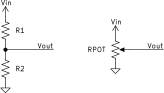
Resistor (left) and potentiometer (right) voltage dividers
A potentiometer has a total resistance, \(R_{pot}\) which is split into “legs”; e.g., \(R_1\) and \(R_2\), such that \(R_{POT} = R_1 + R_2\). The middle connection between the two resistor legs is known as the “wiper”, which is literally a mechanical contact that “wipes” along the \(R_{POT}\). As the potentiometer is manipulated, the wiper is moved and the values of \(R_1\) and \(R_2\) will change, resulting in a changing output:
Given this functionality, potentiometers are used very often as control knobs. For this activity, the “control knob” effectively just provides a linearly changing voltage between 0 V and 3.3 V when turning the potentiometer.
Examples of two types of potentiometers are given in the figure below. The potentiometer type on the top left may be found in the ADALP2000 parts kit where-as the other potentiometer is provided in JEC4201 part shelves in the center of the room.

Examples of potentiometers.
Each of the above potentiometers have three leads coming from them, with type shown below. For both cases, the middle pin of the potentiometer is the wiper whereas the two side pins are the connections to the ends of \(R_{POT}\); the connections to 3.3 V and GND as shown in the schematic above.

Pins of potentiometer. The middle pin is the wiper.
12.3.2. ADC12
The MSPM0G3507 contains two ADC12 modules, which are 12-bit resolution (maximum) ADCs. The ADC12 module documentation for the ADC12 provides a brief discussion on the module which will not be repeated here. Ensure to read the HAL module documentation. The basic steps for setting up the ADC12 module for sampling on a single input “channel” are:
Create an
ADC_Configstruct type variable for configuration.Populate all fields of the created struct to set the ADC’s resolution, sampling type, triggering, etc.
Initialize the ADC module with
void ADC_initADC(),Create one or more
ADC_ChanConfigstruct type variables for initializing all channels that will be converted.Populate all fields of the created struct(s) to set the ADC channel’s conversion memory, voltage reference, and individual triggering behavior.
Initialize each ADC channel by calling
void ADC_initChannel(),Configure each ADC channel’s corresponding GPIO pin to be an analog pin using
void GPIO_initPeripheralAnalogFunction()Configure the internal voltage reference generator, if needed, via
void VREF_setReference(),Enable ADC conversions with
ADC_enableConversions().
Once configuration is complete, the configured ADC12 module may start converting the voltage on the specified pin(s). If the ADC12 was configured to be triggered via a software request (.trigsrc=0) with repeating conversions disabled, then the following steps may be taken (not using interrupts):
Trigger a conversion to start using
bool ADC_startConversion(),Wait for the conversion to complete. This may be done by waiting until the ADC12 module is not “busy” through
uint16_t ADC_getStatus(), for example:while(ADC_getStatus(ADC0).Retrieve the conversion result(s) with
uint16_t ADC_getResult().
The conversion result from the ADC12 module will be an unsigned integer number (uint16_t) with the most significant bits being unused (set to 0). For example: for a specified 12-bit resolution, the conversion will always be of the format 0000 XXXX XXXX XXXX. Likewise, if the resolution was set to 8 bits, then the output would be 0000 0000 XXXX XXXX. This is known as a Right Justified output. The mapping of the analog values to this digital format is provided here.
12.4. Instructions
This activity consists of three parts, where part 1 is a set of problems and part 2 and 3 are hand-on work.
ADC initialization and verification of operation.
Measurement of analog sensors using ADCs.
Part 1 may be done before or after parts 2 and 3.
12.4.1. Part 1: Calculations
Consider a 10-bit ADC configured such that it uses negative and positive voltages references of 0 V and 3.0 V, respectively. If a 1.25 V signal is converted by this ADC, what is: (a) the corresponding value produced by the ADC available within the program?
What is the conversion error of the previous question? That is, what is the difference between the actual voltage and the voltage which may be estimated from the ADC conversion?
For the same ADC configuration as given in question 1: a value of 762 is returned by the ADC. What is the range of input signal voltages that would produce this value?
Consider an 8-bit ADC configured such that it uses negative and positive voltages references of -1.0 V and 3.3 V, respectively. Provide the ADC conversion result for voltages -5 V, -4 V, -3 V, -2 V, -1 V, 0 V, 1 V, 2 V, 3 V, 4 V, 5 V.
A 10 kΩ potentiometer is wired with 0 V on one side and 5 V on the other side. Assuming a linear potentometer, if the wiper is 1/3 the total travel distance away from the 5 V side, what should the voltage on the wiper be?
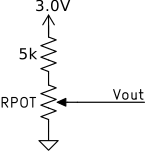
A 10 kΩ potentiometer is wired in series with a 5 kΩ resistor between 0 V and 3.0 V; as shown in the figure below. What is the range for possible wiper voltages?
A pressure sensor is connected to a 12-bit ADC with voltages references of 0 V and 2.5 V. The pressure sensor will output 0-3.3 V corresponding to 100 kPa to 10 MPa. Derive an equation that would convert the ADC output to pressure. What is the maximum pressure that this sensor+ADC pair can accurately convert?
12.4.2. Part 2 - ADC Characterization
Import a new template project for this activity:
Template Projectand rename appropriately.Insert the potentiometer into a breadboard and connect two of the legs to ground and 3.3V (see left portion of schematic below). The wiper of the potentiometer, labelled with the flag to ADC, needs to be connected to a GPIO with analog support. Pins that have analog support may be identified within the GPIO ADC Channel Pin Map table. For the purposes of this lab, the signal should be connected to PA22.

Activity 12 Potentiometer Schematic
Create and complete the ADC initialization function
ADCInit(). Use the guidance from above and ADC12 to:
use ADC0,
configure the ADC to use a resolution of 12 bits,
use the ADC in Single-channel, single-sample mode,
set the ADC to trigger using Software triggering,
set the ADC channel to match that of PA22,
configure the conversion to occur into ADC MEMORY LOCATION 0,
set the channel to convert using the 3.3 V Power Supply (VDD),
and finally, ensure all necessarily initialization functions are called and enable conversions.
Also within the
ADCInit()function: set the GPIO pin to be used such that it is set to Analog Peripheral Functionality.Add
ADCInit()to themain()function at the appropriate location.Create five global or local variables:
uint16_t adc0_val=0,adc1_val=0;,float adc0_est=0,adc1_est=0;anduint16_t sample_number=0;.uint16_t adc0_val=0,adc1_val=0; float adc0_est=0,adc1_est=0; uint16_t sample_number;
Within the
main()functionwhile(1)loop:
add a call to
getchar()to pause the program until a keyboard key is pressed,add code to trigger the ADC conversion,
wait for the result to be available,
save the result into the variable
uint16_t adc0_val,calculate the estimated voltage measured by the ADC (use equation from the lecture or the ADC12 Documentation) and save into the variable
float adc0_est. Be careful of integer division here!Add the print statement:
printf("%u\t%5u\t%f\t%5u\t%f\r\n",++sample_number,adc0_val,adc0_est,adc1_val,adc1_est);
Connect the USB Test Device or bench-top oscilloscope such that the potentiometer output value is measured. You may alternatively use one of the multimeters in the laboratory for this.
Run and test the code: Pressing a keyboard key within the serial console will trigger an ADC conversion. If working correctly, the ADC should convert and the print evaluated. If no print occurs, check the ADC initialization. The printed potentiometer output should match the measurement from the USB Test Device. Rotate or turn the potentiometer to change the output voltage and verify that the printed and measured voltages react accordingly.
With operation of the ADC verified, modify
ADCInit()such that:
The ADC input channel converts using the 2.5 V internal reference,
set the internal voltage reference generator use generate 2.5 V.
With those changes made, duplicate the initializations done for ADC0 such that ADC1 is initialized as well with all the same settings except:
ADC1 uses a resolution of 8 bits,
The converted channel changed such that PA22 is still converted.
These changes should cause the program to convert PA22 twice: once with a 12-bit resolution using ADC0 and once with a 8-bit resolution using ADC1.
Modify the code in the
main()function such that ADC1 performs a conversion at the same time as ADC0. Ensure that the code waits to ensure both are converted..Modify the estimated voltage equation for ADC0 such that it considers the modified voltage reference. Further, duplicate the calculation to also calculated the voltage from ADC1 into variable
float adc1_est.Run and test the code again to ensure that both ADCs are working appropriately.
Record Data: Rotate the potentiometer fully to one side, preferentially such that voltage applied to the ADCs is at or near 0 V. Measure the voltage manually (using USB Test Device, multimeter, or oscilloscope) and record the data in a spreadsheet along-side both estimated voltages reported by the code.
Repeat the above for approximately 10 sample points, rotating the potentiometer each time, attempting to generate equally spaced points.
Plot both estimated voltage values against the measured voltage values (estimated voltage is the y-axis, measured voltage is the x-axis) and label the plot properly. Is ADC saturation evident?
Calculate the error between the estimated voltages and the measured voltages. Considering only sample points that do not exhibit saturation, what is the maximum error seen? Is one set of estimations significantly worse than the other? Calculate the error as \(V_\mathrm{error} = V_\mathrm{measured}-V_\mathrm{estimated}\).
12.4.3. Part 3 - Sensor Measurement
Each of the ADC12 modules on the MSPM0G3507 has access to an internal temperature sensor and a divided version of the supply voltage, VDD: \(V_/mathrm{DD}/3\), known as the Supply Monitor signal. Additionally, there is an external thermistor available on the Launchpad Board, connected to either PB24 or PA26. For the purposes of this lab, ensure that the thermistor is connected to PB24 by checking/setting proper placement of jumper shown below:

Launchpad Board thermistor and jumper setting.
The voltage connected to PB24 is actually the output of a voltage divider with the thermistor being the bottom resistor and high-tolerance 10~kΩ resistor on the top:

Launchpad Board connection of thermistor.
Copy the project/code from Part 1 to modify for this part 2. Remove all configuration and use of ADC1.
Modify
ADCInit()such that:ADC0 now samples a 4-channel sequence instead of a single channel,
ADC_MEM_INDEX_0is left as-is,ADC_MEM_INDEX_1is set to convert PB24,ADC_MEM_INDEX_2is set to convert the Internal Temperature Sensor,ADC_MEM_INDEX_3is set to convert the VDD Supply Monitor.
Within the
main()function: modify the conversion math to:Convert the PB24 measurement to Temperature. This must be done first by converting the ADC output to voltage and then applying the equation:
\[T[\mathrm{℃}] = -1.1588 V_\mathrm{PB24}^4 + 48.695 V_\mathrm{PB24}^3-198.88 V_\mathrm{PB24}^2+472.88 V_\mathrm{PB24} -423.28\]Important
Exponents cannot be done with
^in C as that is the XOR operation. An easy way to implement an exponent is to expand it to a multiplication. For example:\[V_\mathrm{PB24}^3 = V_\mathrm{PB24}V_\mathrm{PB24}V_\mathrm{PB24}\]Convert the Internal Temperature Sensor measurement to Temperature. This requires several steps:
Again, this first requires converting the ADC output to voltage, \(V_\mathrm{its}\).
Then, a calibration voltage must be extracted from the microcontroller, which is programmed after manufacturing. The calibration voltage, \(V_\mathrm{cal}\), can be extracted with
float vcal = 0.0008057*FACTORYREGION->TEMP_SENSE0;Finally, calculate the temperature using the equation:
\[T[\mathrm{℃}] = 555.56 \left(V_\mathrm{cal}-V_\mathrm{its}\right)+30\mathrm{℃}\]
Convert the Supply Monitor measurement to VDD Voltage. Once again, convert the ADC output to voltage, then multiply by 3.
Remove the existing
printf()and add new one which prints the above values (including the potentiometer voltage).Run and test the code. Ensure all values make sense:
The thermistor temperature should be approximately the room temperature (around 20-25℃).
The internal temperature sensor should be reading a value above the room temperature sensor; though not necessarily much higher (if at all).
The VDD voltage should be approximately 3.3 V.
Take a screenshot of the terminal showing these outputs.
Submit the plots and answer generated in Part 2 and the screenshot from Part 3 to the Gradescope assignment. Further, submit both codes.